Category: blogtools

This is navel gazing at it’s best, a blog post about blog tools

  • Personal data stores and pub/sub networks – O’Reilly Radar

    Now social streams have largely eclipsed RSS readers, and the feed reading service I’ve used for years — Bloglines — will soon go dark. Dave Winer thinks the RSS ecosystem could be rebooted, and argues for centralized subscription handling on the next turn of the crank. Of course definitions tend to blur when we talk about centralized versus decentralized services.

    via Personal data stores and pub/sub networks – O’Reilly Radar.

    Here now, more Uncertainty and Doubt surrounding RSS readers as the future of consuming web pages. I wouldn’t expect this from the one guy I most respect when it comes to future developments in computer technology. I have followed Jon Udell’s shining example each step of the way from Radio Userland to Bloglines. And I breathed deeply the religion of loosely coupled services tied together with ‘services’ like pub/sub or RSS feeds. The flexibility and robustness of not letting a single vendor or purveyor of a free services to me was obvious. However I have fallen prey to the siren song of social media, starting with Digg, Flickr, Google Reader, LinkedIn. Each one claiming some amount of market share, but none of them anticipating the wild popularity of Friendster, MySpace and now Facebook. I actively participate in Facebook to help keep everyone energized and to let them know someone is reading the stuff they post. I want this service to succeed. And by all accounts it’s succeeding beyond its wildest dreams, through advertising revenue.

    But who wants to be marketed to? Doc Searles argued rightly our personal information is ours, our ‘attention’ is ours. He wants something like a Vendor Relationship Management service where we keep our ‘profile’ information and dole out the absolute minimum necessary to participate online or do commerce. And Jon in this article uses the elmcity project as a sterling example of how many stovepipe social networks in which we participate. Jon’s work with elmcity is an ongoing attempt to have events be ‘subscribe-enabled’ the way blogs or online news websites are already. Each online calendar program has a web presence, but usually does not have a comparable publication/subscription service like RSS or iCalendar formats associated with them. To ‘really’ know what is going requires a network of event curators who can manage the data feeds that then get plugged into an information hub that aggregates all the events in a geographical region. It’s all loosely coupled and more robust than trying to get everyone to adopt a single calendar.

    Which brings us back to the online personal data store, why can’t we have a ‘hub’ that aggregates these ‘services’ we participate in but contain the single source of profile information that we manage and dole out? In that way I’m not hostage to End User Licenses and the attendant risks of letting someone else be my profile steward. Instead I can manage it and let the services subscribe to my hub, and all my ‘data stores’ can exist across all the social networks that exist or may exist. No Lock In. Think about this, I cannot export all the little write-ups and comments on made on headlines I posted in Bloglines. I could export my Blogroll though, using OPML (thanks Dave Winer!) Similarly I won’t ever be able export any of my numerous status updates in Facebook. In fact as near as I can tell there is no Export Button anywhere for anything. It’s like AOL, an internet cul-de-sac that we all willingly participate in, never considering consequences.

  • The Ask.com Blog: Bloglines Update

    Image representing Steve Gillmor as depicted i...
    Steve Gilmor Image via CrunchBase

    As Steve Gillmor pointed out in TechCrunch last year , being locked in an RSS reader makes less and less sense to people as Twitter and Facebook dominate real-time information flow. Today RSS is the enabling technology – the infrastructure, the delivery system. RSS is a means to an end, not a consumer experience in and of itself. As a result, RSS aggregator usage has slowed significantly, and Bloglines isn’t the only service to feel the impact.. The writing is on the wall.

    via The Ask.com Blog: Bloglines Update.

    I don’t know if I agree with the conclusion RSS readers are a form of lock-in. I consider Facebook participation as a form of lock-in as all my quips, photos and posts in that social networking cul-de-sac will never be exported back out again. There’s no way to do it, never ever. With an RSS reader at least my blogroll can easily be exported and imported again using OPML formatted ASCII text. How cool is that in the era of proprietary binary formats (mp4, pdf, doc). No I would say RSS is kind of innately good in and of itself. Enabling technologies are like that and while RSS readers are not the only way to consume or create feeds I haven’t found one of them that couldn’t import my blogroll. Try doing that with Twitter or Facebook (click the don’t like button).

  • 7 Things You Should Know About Google Wave | EDUCAUSE

    Wave challenges us to reevaluate how communication is done, stored, and shared between two or more people.

    logo
    Google Wave

    via 7 Things You Should Know About Google Wave | EDUCAUSE.

    Point taken, since I watched the video of the demo done last spring I too have been smitten with the potential uses of Google Waves. First and foremost it is a communication medium. Second of all unlike email, there are no local, unsynced copies of the text/multimedia threads. Instead everything is central like an old style bulletin board, newsgroup or collaborative wiki. And like a  wiki revisions are kept and can be “Played Back” to see how things have evolved over time. For people recognizing the limits of emailing attachments to accomplish this goal of group editing, the benefits far outweigh the barriers to entry. I was hoping to get an invitation into Google Waves, but haven’t yet received one. Of course if I do get invited, the problem of the Fax Machine will crop up. I will need to find someone else who I know well enough to collaborate with in order to try it out. And hopefully there will be a ready and willing audience when I do finally get an invite.

    As far as how much better is Waves versus email, it depends very much on how you manage your communications already. Are you a telephone person or an email person or a face-to-face person. All these things affect how you will perceive the benefits of a persistent central store of all the blips and waves you participate in. I think Google could help explain things even to us mid-level technilogically capable folks who are still kind of bewildered by what went on in the Demos at Google Developer Day. But this PDF Educause has compiled will help considerably. The analogy I’m using now is the bulletin board/wiki/collaborative document example. Sometimes it’s just easier to understand something in comparison to something you already know/use/understand.

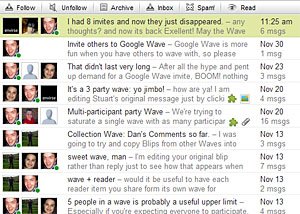
    a list of Google Waves with participant icons
    Waves can start to add up

    PS: Finally got an invite from Google Waves about two weeks ago and went hog wild inviting people to join in. If you want to include me in a Wave add me to your list as: carpetbomberz@googlewave.com. Early returns from sending invites and participating in some experimental Waves has shown the wild popularity dying down quite a bit. At one point we had 8 participants in one single Wave. Trying out some of the add-on tools was interesting too. But the universe of add-ons is pretty small at this point. Hopefully Google will get that third party development effort going in high gear. As far as the utility of the Google Waves, it is way too much like a super-charged glorified bulletin board. It doesn’t have any easy hooks in or out to other Social Media infrastructure. Someone has to make it seamless with Facebook/Twitter/Gmail either though RSS hooks or making the whole framework/interface embeddable or linkable in other websites. As always we’ll see how this goes. They need to keep a torrid pace of development like Facebook achieved from 2005-2007 improving and adding membership to the Google Wave Universe.

  • iTunes U: The Beginning

    It’s interesting to see how the whole iTunes U structure works. I’ve been reading documentation about the ‘web services’ enabled within iTunes U. It completely replicates the GUI functions but through a semi-automated interface. Reminds me a little of how you can change the underlying LDAP directory structure using LDIF commands or LDIF files with all the changes embedded within it. In iTunes U, you do an HTTP PUT securely with a signed token, and the iTunes U Web service sucks that up and executes all the commands embedded within your XML file that you put. Very powerful, but very scary too as these changes are made to your production environment. So there’s no real easy way to test the results of your commands without just taking a big risk, leaping in and seeing what happens. This is like SQL commands where you DROP TABLE, not a fun thing to do. DROP TABLE is a big black whole that makes your data disappear in an unrecoverable way. iTunes U has similar functions where you delete the structure AND the data at the same time. You may restore the structure (by backing up your data tree in XML format), but the data embedded within the tree, well that’s gone. So restoring stuff is going to be impossible if you get the syntax wrong in your XML file. The only real benefit to me now is the ability to get a listing of the whole site structure using the Tree command and then forcing an update to any groups that are of the type RSS Feed. The update will be necessary if anyone adds files to a podcast being hosted on servers within our institution.

    I discovered or re-discovered a tool called Woolamaloo which was introduced to me during the Apple iTunes training. University of Illinois Champaign-Urbana created it to allow you to use a GUI to control the Web services from a desktop OS. This is good as I was at a loss to adapt the sample code into anything like a reliable generator of tokens to send to iTunes U web services. I couldn’t figure out what parts of the java example to comment out and recompile. Starting this Monday I’m going to put Woolmaloo through it’s paces. If I can force the RSS feeds to update on demand when somebody has a problem updating their Podcast feeds, I can at least speed things up. But I’m still very leery of deleting or merging any section. I will copy so I can make a course appear in more than one place without using the iTunes multi-click interface. But I will not delete or merge.

    And just today I also discovered there are Apple Automator scripts readily available that add a graphical layer on top of all the web services goodness. So now I can integrate a bunch of steps from uploading bunches of files, forcing RSS feeds to update to merging/rename whole sections all from Automator. I’m going to test it and se how good it really works.

  • Email is crap: The past is yours, the future’s mine!

    File this!
    File this!

    Considering the evolution of email and the Internet it’s a wonder we cling to it so tenaciously. The original Internet was slow, unreliable, and had a small number of actual users. Email was a messaging mechanism allowed communication to occur asynchronously over a slow unreliable network. And the mechanims used to transport it prior to the ever popular SMTP server was something called Unix to Unix Copy Protocol. Your messages to people would get copied over the network as files to another Unix computer. Eventually they would get routed to the mail spool on a machine your recipient had an account on. He could then read the message and reply to it. Kind of like telegrams back and forth. So what if you got a telegram with no subject line? Or a telegram with all kinds of tasks for different projects all wrapped up into a single message?

    Dan Dube @ dandube.com complains that Filing Cabinets which approximates the desktop computing metaphor are not good. The extra work required to make the Filing Cabinet work outweighs the benefit of the activity the email is helping take place.

    Each email is a file, so each email needs an informative, relevant title.  Look in your inbox — I would guess there are almost no emails that fit that bill.

    Nobody uses subject lines. I get blank subject lines from people. Or they put the vaguest subjects in the subject line.

    Emails don’t happen in a vacuum, people reply to them, are added and subtracted from the distribution list, change the content, etc.  Yet we still treat each email as a singular file.

    That’s the truth, especially for group projects, or worse committee projects where people come and go. You don’t know sometimes where a requirement or task ever came from because you don’t have the original text in an email from the person that proposed it. There’s no trail or flight data recorder for what transpired in that email message.

    Emails don’t always categorize nicely.  If they fit in more than one “folder”, the filing cabinet metaphor will fail.

    I couldn’t agree more. If you have a boss who starts using ‘bullet points’ in the email you know you will need to file that thing in more than one spot. I have a boss that does this often and it takes a few minutes to parse out the tasks that are expected to be accomplished. Once that’s done, which “project” do you file that email message into?

    Emails are extraordinarily redundant, with the original message copied hundreds of times in long conversations.

    Oh the insanity of quote all. And worse yet I think Outlook turns it on by default. Occasionally I will go back through that really long message and delete everything except my own contributions so the email is physically shorter in length and easier to read.

    Files can be emailed, which immediately forks the original file and makes any further edits a synching problem.

    This happens all the time rather than copy and paste the text of another file into the medium of the email message, the immediacy of ‘attaching’ just makes it too appealing. Someone is ‘dumping’ the task off on you with the minimum effort necessary, and that means they attach the file that has the exact same text they could have included in the email. Worse yet, sometimes those attachments are PDFs! Useless,useless,useless. Try keeping track of that mix of files.

    All of these gripes apply to the file system of the computer, too.  Regular files (mp3, doc, html, etc) all have the same shortcomings.

    Again it’s hard to associate files in a wide range of ways that make sense for a variety of projects. None of us are limited to one file type in all the projects we do. We might have pictures, audio, video, text, etc.

    Now Dan mentions Google Waves. And I wrote a quick blurb about Google Waves about week after the Google demo in San Francisco. Waves is by design, very different from email. It’s not copying files from one server to another over an unreliable slow network. It is meant to give you realtime text based communication in whatever collaborative style you prefer. And it keeps a record of everything, so you can step back through a document at each version or stage of editing.

    It’s kind of like chat too. You just start a connection with one other person, start inviting in participants as you go. And as part of the record of the ‘Wave’ or wavelength, you have buddy icons of all the participants. And everything is a reference to that original wave. So file it wherever you want, open it from wherever you want, it all points back to the original and will edit that original file for you AND all the participants. Because like I said, there is but one original, one index everyone’s client points to that same EXACT REFERENCE. That’s the genius of the wave format of communication and collaboration. Waves is a giant shared workspace, nobody really keeps private copies and edits them. They always edit the shared copy no matter what. And so the mailbox/cabinet metaphor is broken at last.

    So if it’s not a filing cabinet we’re looking for, but Google Waves, what’s the metaphor? Instead of a filing cabinet in my office, I now use a big giant bulletin board that sits in the hallway in my building. And everyone posts there and edits there and nobody keeps copies of anything anywhere on the bulletin board. The original bulletin is there with all it’s edits recorded, all the participants in the document are recorded for all to see. Scary isn’t it?

  • Yahoo Pipes via Dan Dube dot Com

    Yahoo Pipes plus Twitter = Good
    Yahoo Pipes plus Twitter = Good

    There is nothing cooler than discovering you can take a feed from one bit of RSS and plug it into another service and slowly create your own custom feeds based on simple keyword filters. But that service is here today using the mechanism of ‘pipes’ ala Unix style input/output of character streams from one application into another. Take for instance in Unix the ability list the contents of a folder in a long detailed format:

    ls -al

    Now what good is that if there’s a thousand files that get spit back in your face? Now add the power of Unix pipes, and the search command known as ‘grep’

    ls -al | grep interestingThings*.txt

    So now I can take the output of the first command and rather than send that output directly to my computer screen, I ‘pipe’ i t over to the grep command and let it do a search in real time on all that text output. I get a list of things as a result:

    interestingThings1.txt
    interestingThingsFoo.txt
    etc.

    So Yahoo Pipes extends this metaphor into the real of http and rss/xml feeds of data from Twitter, Blogs, Web based RSS news readers and allows you to find stuff as soon as it is sent out for mass consumption on the Interwebs. And like all things, it also allows you to add your own personal spin by blogging about that which you have discovered through the Yahoo Pipes. Flame On!

    For example, suppose I wanted to search for news on Google, specifically about Chrome. There could be useful things popping up at any minute, and I could easily miss them (like leaked screenshots!) This is what you could consider doing:

    * Create a twitter search for #google

    * Subscribe to the RSS feed of that search

    * Send the RSS feed to the pipes, where it is filtered for the word “chrome”

    * Subscribe to the RSS feed that comes out of the pipes

    Now you can monitor any breaking developments about chrome as they happen (more or less)!

    This is the real power of the web 2.0 stuff, the ability to make your own stuff. No longer will we have to rely on any one place to get info. I am using twitter, google, and yahoo to get my information here!

    via Yahoo Pipes.

  • Google Wave – The Shape of Things to come

    The Google IO conference in Australia
    The Google IO conference by Niall Kennedy

    via: Official Google Blog: Went Walkabout. Brought back Google Wave

    Did anyone watch the demo video from Google Australia? A number of key members from Google Maps set out to address the task of communication and collaboration. Lars and Jens Rasmussen decided now that Gmaps is a killer, mash-up enabled web app, it’s time to design the Next Big Thing. Enter Google Wave, it is the be all end all paradigm shifting cloud application of all time. It combines all the breathless handwaving and fits of pique that Web 2.0 encompassed 5 years ago. I consider Web 2.0 to have really started the Summer of 2004 with some blogging and podcasting efforts going on and slow but widespread adoption of RSS publishing and subscribing. So first I’ll give you the big link to the video of the demo by Lars Rasmussen and Company:

    It is 90 minutes long. It is full of every litte UI tweak and webapp nicety along with rip-roaring collaboration functionality examples and “possible uses” for Google Wave. If you cannot or will not watch a 90 minute video just let me say pictures do speak louder than words. I would have to write a 1,000 page manual to describe everything that’s included in Google Wave. First let’s start off the list of what Google Wave is ‘like’.

    It’s like email. You can send and receive messages with a desktop software client. It’s like Chat, you can chat live with anyone who is also on Google Wave. It’s like webmail in that you can also run it without a client and see the same data store. It’s like social bookmarking, you find something you copy it, you keep it, you annotate it, you share it. It’s like picture sharing websites, you take a picture, you upload it, you annotate it, you tag it, you share it. It’s like video sharing websites, same thing as before, upload, annotate, tag, share. It’s like WebEx where you give a presentation, everyone can see the desktp presentation as you give it and comment on it through a chat back-channel. It’s like Sharepoint where you can check-in, check-out documents, revise them, see the revisions and share them with others. It’s like word processor, it has spell checking enabled live as you type. It can even translate into other languages for you on the fly. It’s like all those Web 2.0 mash-ups where you take parts from one webapp and combine them with another so you can have Twitter embedded within your Google Waves. There are no documents as such only text streams associated with authors, editors, recipients, etc. You create waves, you share waves, you store waves, you edit waves, you embed waves, you mash-up waves. One really compelling example given towards the end is using Waves as something like a Content Managements System where mulitple authors work, comment, revise a single text document (a wave) and then collapse it down into a single new revision that get’s shared out until a full document, fully edited is the final product. Whether that be a software spec, user manual or website article doesn’t matter the collaboration mechanism is the same.

    So that’s the gratuitous list of what I think Google Wave is. There is some question as to whether Gmail, Google Docs & Spreadsheets will go away in favor of this new protocol and architecture. Management at Google have indicated it is not the case, but that the current Google suite would adopt Google Wave like functionality. I think the collaboration capability would pump-up the volume on the Cloud based software suite. Microsoft will have to further address something like this being made freely available or even leaseable for private business like Gmail is today. And thinking even farther ahead for Universities using Course Management Systems today,… There’s a lot of functionality in Google Wave that is duplicated in 90% of pay for, fully licensed software for Content Management Systems. Any University already using Gmail for student email and wanting to dip their toes into Course Management Systems should consider Google Wave as a possibility. Better yet, any company that repackages and leverages Google Wave in a new Course Management System would likely compete very heavily with the likes of Microsoft/Blackboard.

  • Wikipedia edit wars revisited

    Regarding & related to: Replaying history « Jon Udell.

    Did you know that recently Wikipedia banned editing articles on the Church of Scientology? This reminded me of a project where Jon Udell showed an animation of  edits done to a Wikipedia page. Only through animating and visualizing the process did one really understand what had happens to a Wikipedia article over time. Each bit of phrasing, verbiage and links goes back and forth with paragraphs and sentences disappearing then reappaearing. We don’t think of editing words as inherently visual. Compared to film or music recording, writing prose or technical writing is a mental exercise, not a visual one. Yet, when shown a compelling example like Jon Udell’s we inherently just ‘get it’.

    After that article was published by Jon Udell and since the wikiAnimate example coursed its way through the Internet, there hasn’t been much noticeable follow-up action. Lots of good ideas are left to wither in the Internet Archive. I don’t see a lot of Slashdot activity on visualizing wiki edits. The biggest problem Jon points out with the original wikiAnimate solution was that it would do a round trip of HTTP GET for every step shown in the animation. This loads down the network way too much and hits Wikipedia with to many HTTP GET requests. Jon Udell, ever the vigilant writer/researcher decided to revisit the original idea. Jon is a kind of pragamtist who readily adapts what already exists. He suggests a couple of ways existing projects could be adapted to the purpose of visualizing changes in text as it is written.

    The Wave toolkit from Google is one example. Google Wave has the ability to “playback” conversations back and forth over a period of time. Maybe that ‘playback’ feature could be re-used by an enterprising developer using the Wave APIs. Another possible solution Jon Udell gives is FeedSync which is implemented in the Windows Live webservice. My assumption is there is some kind of flight recording like ability to track each step, then play it back. I don’t write software or develop software. I barely do scripting. however Jon Udell is big on prototyping and showing full examples of how a Social Bookmarking service like del.icio.us could be adapted to the purpose of aggregating community calendars and transforming their contents into multiple output formats for re-consumption. And he’s willing to write just enough middleware and glue code to make it work. It’s a kind of rampant re-usableism. I would characterize the philosophy as this: Sure there’s enough good ideas/products out there one must only decompose the problem to the point where you see the pattern fit well with an existing solution. That’s the true genius of a guy like Jon Udell.

  • Finally, a minor contribution

    One of my favorite passtimes is to listen to a podcast called the Dawn and Drew Show. And let me tell you when you join their message board you begin the understand the value of Listener Generated Content. Adam Curry has benefited from this too with his podcast Daily Source Code. I’ve sent a few emails at different times to Adam, one of which got a mention on his show. Sometimes, I fall so far behind in listening to the shows I don’t feel I can make a legitimate contribution. I’ve been doing a lot better recently keeping up with Dawn and Drew episodes so I threw together this little ditty in Photoshop:Peanuts Dawn and Drew

    Hopefully, the next step would be a good phone line comment about something happening recently in one of the episodes. But I don’t want to get ahead of myself. Little steps, little baby steps.

  • Word 2007 test post

    I’m recommitting myself to my podcast, Carpet Bomberz Inc. I’ve been too timid in publishing regular podcasts due to worries over whether or not I had waited long enough for interesting things to happen in my life in order to report on them. I have been reading Michael Geoghagen’s book Podcast Solutions in the early chapters where Geoghagen says to follow your bliss when it comes to the topic of the podcast. While I admit to being somewhat vain, and like reporting one what’s been going on, something more topic driven might prove to be a better vehicle for me podcasting-wise. I ran through about 20 topics, some of them related to musings about how certain inventions could have been improved, some of them comedic attempts at story telling, and others just straight discoveries of some obscure techno logia (technology and nostalgia). This list will now be the driving force for this next phase of the podcast. I’m going to also follow some other pointers like registering a domain name and putting a WordPress blog into production to support the Podcast. Blogposts, podcasts, Flickr galleries, del.icio.us tags will all combine into what will be a base for some Google Adsense banner ads for the Blog. If Adam Curry, Dawn and Drew can do it so can I. All I’m looking to do is support the cost of the website, domain registration and pay for the audio equipment I’ve already amassed, and nothing more. Fame is not an option.