Google now denies they are releasing Google Maps for the iPhone. Take this whole article with a big grain of salt. I’m just glad I didn’t post this immediately after reading the original article on AppleInsider. By the end of the day last Friday April 23rd, Google was denying the rumor already. The moral of the story is look before you leap.
Google this week said it plans to bring Google Maps Navigation, its free turn-by-turn GPS software already available on Android, as an application for Apple’s iPhone.
According to MacUser, Google officials confirmed at a London, England, press conference that its satellite navigation software would be coming to “other” platforms, including the iPhone. No dates for potential availability were given
April 23rd 2010 Amazing, just when you thought you knew what was going on Google can come along and change things entirely. I ask how does one give away GPS navigation? Four years ago this couldn’t have been conceived or dreamed of given the market for GPS navigation. Now, meh, just give it away. I wish Google great success as this is almost compelling enough for me to get an iPhone now.
Previously you needed an Android based Smartphone usually available only on Verizon. But now there’s a multitude off choices, Garmin’s A50 is coming to AT&T and has my favorite navigation interface along with Google Maps if you want it. Which is what I would prefer. I’m hoping Garmin continues to evolve this to integrate any and all live data it cannot incorporate with its stand alone navigation units which to date don’t have live internet connections (whereas TomTom Live! units do). I’m most interested in any live data that might benefit me in a sudden traffic jam or a new Point of Interest not compiled since the last download/update to the navigation software.
Google’s entry to the iPhone navigation arena would force TomTom, Navigon, and now Garmin all to take heed and compete more vigorously especially since Google would be giving its software away. I’m guessing they could promote themselves as being advertisement free alternatives to the Google Maps Navigation?
I used to do this with a plug-in called Google Browser Sync on Mozilla back in the day. Since then, there’s a Firefox plug-in for Delicious that would help keep things synced up with that bookmark sharing site. But that’s not really what I wanted. I wanted Google Browser Sync, and now I finally have it again, cross platform.
At long last Mac and PC versions of the Google Chrome web browser have the ability to save bookmarks to Google Docs and sync all the changes/additions/deletions to that single central file. I’m so happy I went through and did a huge house cleaning on all my accumulated bookmarks. Soon I will follow-up to find out which ones are dead and get everything ship-shape once again. It’s sad the utility of a program like browser sync is taken away. I assume it was based on arbitrary measures of popularity and success. Google’s stepping down and taking away Browser Sync gave some developers a competitive edge for a while, but I wanted Browser Sync no matter who it was that did the final software development. And now finally I think I have it again.
Why is bookmark syncing useful? The time I’ve spent finding good sources of info on the web can be wasted if all I ever do is Google searches. The worst part is every Google search is an opportunity for Google to serve me AdWords related to my search terms. What I really want is the website that has a particularly interesting article or photo gallery. Keeping bookmarks direct to those websites bypasses Google as the middleman. Better yet, I have a link I can share with friends who need to find a well vetted, curated source of info. This is how it should be and luckily now with Chrome, I have it.
I use google wave every single day. I start off the day by checking gmail. Then I look at a few news sites to see if anything of interest happened. Then I open google wave: because thats where my business lives. Thats how I run a complicated network of collaborators, make hundreds of decisions every day and organise the various sites that made me $14.000 in december. On how Google Wave surprisingly changed my life – This is so Meta.
I’m glad some people are making use of Google Wave. After the first big spurt of interest, sending invites out to people interest tapered off quickly. I would login and see no activity whatsoever. No one was coming back to see what people had posted. So like everyone else I stopped coming back too.
Compare this also to the Facebook ebb and flow. I notice the NYTimes.com occasionally slagging Facebook with an editorial in their Tech News section. Usually the slagging is conducted by someone who I would classify as a pseudo technology enthusiast (the kind that doesn’t back up their files, then subsequently writes about it in an article to complain about it). Between iPhone upgrades and writing up the latest free web service they occasionally rip Facebook in order to get some controversy going.
But as I’ve seen Facebook has a rhythm of less participation then periods of intense participation. Sometimes it’s lonely, people don’t post or read for months and months. It makes me wonder what interrupts their lives long enough that people stop reading or writing posts. I would assume Google Wave might suffer the same kind of ebb and flow even when used for ‘business’ purposes.
So the question is, does any besides this lone individual on Posterous use Google Wave on a daily business for work purposes?
And with that we enter a killer app for the cell phone market and the end of the market for single purpose personal navigation devices. Everyone is desperate to get a sample of the Motorola Droid phone to see how well the mix of features work on the phone. Consumer Reports has tried out a number of iPhone navigation apps to see how they measure up to the purpose built navigators. For people who don’t need specific features or generally aren’t connoisseurs of turn-by-turn directions, they are passable. But for anyone who bought early and often from Magellan, Garmin and TomTom the re-purposed iPhone Apps will come up short.
The Motorola Droid however is trying to redefine the market by keeping most of the data in the cloud at Google Inc. datacenters and doing the necessary lookups as needed over the cell phone data network. This is the exact opposite of most personal navigation devices where all the mapping and point of interest data are kept on the device and manually updated through very huge, slow downloads of new data purchased online on an annual basis (at least for me). Depending on the results Consumer Reports gets, I’ll reserve judgment. This is not likely to shift the paradigm currently of personal navigation except that the devices are going to be necessarily even more multipurpose than Garmin has made them. And unwillingly made them at that. The Garmin Nuviphone was supposed to be a big deal. But it’s a poor substitute for a much cheaper phone and more feature filled navigation device. I think the inclusion of Google Maps and Google StreetView is the next big thing in navigation as the Lane assistance differentiated TomTom from Garmin about a year and a half ago. So radical incrementalism is the order of the day still in personal GPS devices. But with an open platform for developing navigation services, who knows what the future may hold. I’m hoping the current oligarchy between Garmin and TomTom starts to crumble and someone starts to eat away at the low end or even the high end of the market. Something has got to give.
Point taken, since I watched the video of the demo done last spring I too have been smitten with the potential uses of Google Waves. First and foremost it is a communication medium. Second of all unlike email, there are no local, unsynced copies of the text/multimedia threads. Instead everything is central like an old style bulletin board, newsgroup or collaborative wiki. And like a wiki revisions are kept and can be “Played Back” to see how things have evolved over time. For people recognizing the limits of emailing attachments to accomplish this goal of group editing, the benefits far outweigh the barriers to entry. I was hoping to get an invitation into Google Waves, but haven’t yet received one. Of course if I do get invited, the problem of the Fax Machine will crop up. I will need to find someone else who I know well enough to collaborate with in order to try it out. And hopefully there will be a ready and willing audience when I do finally get an invite.
As far as how much better is Waves versus email, it depends very much on how you manage your communications already. Are you a telephone person or an email person or a face-to-face person. All these things affect how you will perceive the benefits of a persistent central store of all the blips and waves you participate in. I think Google could help explain things even to us mid-level technilogically capable folks who are still kind of bewildered by what went on in the Demos at Google Developer Day. But this PDF Educause has compiled will help considerably. The analogy I’m using now is the bulletin board/wiki/collaborative document example. Sometimes it’s just easier to understand something in comparison to something you already know/use/understand.
Waves can start to add up
PS: Finally got an invite from Google Waves about two weeks ago and went hog wild inviting people to join in. If you want to include me in a Wave add me to your list as: carpetbomberz@googlewave.com. Early returns from sending invites and participating in some experimental Waves has shown the wild popularity dying down quite a bit. At one point we had 8 participants in one single Wave. Trying out some of the add-on tools was interesting too. But the universe of add-ons is pretty small at this point. Hopefully Google will get that third party development effort going in high gear. As far as the utility of the Google Waves, it is way too much like a super-charged glorified bulletin board. It doesn’t have any easy hooks in or out to other Social Media infrastructure. Someone has to make it seamless with Facebook/Twitter/Gmail either though RSS hooks or making the whole framework/interface embeddable or linkable in other websites. As always we’ll see how this goes. They need to keep a torrid pace of development like Facebook achieved from 2005-2007 improving and adding membership to the Google Wave Universe.
I haven’t received my invite yet, but I did sign up. So my fingers are still crossed and I’m hoping I see the invite in my gmail inbox soon. And I some other people I know signed up too, because what’s the use of this exercise if you aren’t collaborating with another person.
In this morning’s blog post, Rasmussen did say there were still some key features missing from Wave that the company has yet to implement. At the moment you can’t remove a friend from a wave, define groups of users or configure the permissions of users on wave. Rasmussen said that they’d be rolling out those features, along with a draft mode and more, over the next few months.
Considering the evolution of email and the Internet it’s a wonder we cling to it so tenaciously. The original Internet was slow, unreliable, and had a small number of actual users. Email was a messaging mechanism allowed communication to occur asynchronously over a slow unreliable network. And the mechanims used to transport it prior to the ever popular SMTP server was something called Unix to Unix Copy Protocol. Your messages to people would get copied over the network as files to another Unix computer. Eventually they would get routed to the mail spool on a machine your recipient had an account on. He could then read the message and reply to it. Kind of like telegrams back and forth. So what if you got a telegram with no subject line? Or a telegram with all kinds of tasks for different projects all wrapped up into a single message?
Dan Dube @ dandube.com complains that Filing Cabinets which approximates the desktop computing metaphor are not good. The extra work required to make the Filing Cabinet work outweighs the benefit of the activity the email is helping take place.
Each email is a file, so each email needs an informative, relevant title. Look in your inbox — I would guess there are almost no emails that fit that bill.
Nobody uses subject lines. I get blank subject lines from people. Or they put the vaguest subjects in the subject line.
Emails don’t happen in a vacuum, people reply to them, are added and subtracted from the distribution list, change the content, etc. Yet we still treat each email as a singular file.
That’s the truth, especially for group projects, or worse committee projects where people come and go. You don’t know sometimes where a requirement or task ever came from because you don’t have the original text in an email from the person that proposed it. There’s no trail or flight data recorder for what transpired in that email message.
Emails don’t always categorize nicely. If they fit in more than one “folder”, the filing cabinet metaphor will fail.
I couldn’t agree more. If you have a boss who starts using ‘bullet points’ in the email you know you will need to file that thing in more than one spot. I have a boss that does this often and it takes a few minutes to parse out the tasks that are expected to be accomplished. Once that’s done, which “project” do you file that email message into?
Emails are extraordinarily redundant, with the original message copied hundreds of times in long conversations.
Oh the insanity of quote all. And worse yet I think Outlook turns it on by default. Occasionally I will go back through that really long message and delete everything except my own contributions so the email is physically shorter in length and easier to read.
Files can be emailed, which immediately forks the original file and makes any further edits a synching problem.
This happens all the time rather than copy and paste the text of another file into the medium of the email message, the immediacy of ‘attaching’ just makes it too appealing. Someone is ‘dumping’ the task off on you with the minimum effort necessary, and that means they attach the file that has the exact same text they could have included in the email. Worse yet, sometimes those attachments are PDFs! Useless,useless,useless. Try keeping track of that mix of files.
All of these gripes apply to the file system of the computer, too. Regular files (mp3, doc, html, etc) all have the same shortcomings.
Again it’s hard to associate files in a wide range of ways that make sense for a variety of projects. None of us are limited to one file type in all the projects we do. We might have pictures, audio, video, text, etc.
Now Dan mentions Google Waves. And I wrote a quick blurb about Google Waves about week after the Google demo in San Francisco. Waves is by design, very different from email. It’s not copying files from one server to another over an unreliable slow network. It is meant to give you realtime text based communication in whatever collaborative style you prefer. And it keeps a record of everything, so you can step back through a document at each version or stage of editing.
It’s kind of like chat too. You just start a connection with one other person, start inviting in participants as you go. And as part of the record of the ‘Wave’ or wavelength, you have buddy icons of all the participants. And everything is a reference to that original wave. So file it wherever you want, open it from wherever you want, it all points back to the original and will edit that original file for you AND all the participants. Because like I said, there is but one original, one index everyone’s client points to that same EXACT REFERENCE. That’s the genius of the wave format of communication and collaboration. Waves is a giant shared workspace, nobody really keeps private copies and edits them. They always edit the shared copy no matter what. And so the mailbox/cabinet metaphor is broken at last.
So if it’s not a filing cabinet we’re looking for, but Google Waves, what’s the metaphor? Instead of a filing cabinet in my office, I now use a big giant bulletin board that sits in the hallway in my building. And everyone posts there and edits there and nobody keeps copies of anything anywhere on the bulletin board. The original bulletin is there with all it’s edits recorded, all the participants in the document are recorded for all to see. Scary isn’t it?
Did anyone watch the demo video from Google Australia? A number of key members from Google Maps set out to address the task of communication and collaboration. Lars and Jens Rasmussen decided now that Gmaps is a killer, mash-up enabled web app, it’s time to design the Next Big Thing. Enter Google Wave, it is the be all end all paradigm shifting cloud application of all time. It combines all the breathless handwaving and fits of pique that Web 2.0 encompassed 5 years ago. I consider Web 2.0 to have really started the Summer of 2004 with some blogging and podcasting efforts going on and slow but widespread adoption of RSS publishing and subscribing. So first I’ll give you the big link to the video of the demo by Lars Rasmussen and Company:
It is 90 minutes long. It is full of every litte UI tweak and webapp nicety along with rip-roaring collaboration functionality examples and “possible uses” for Google Wave. If you cannot or will not watch a 90 minute video just let me say pictures do speak louder than words. I would have to write a 1,000 page manual to describe everything that’s included in Google Wave. First let’s start off the list of what Google Wave is ‘like’.
It’s like email. You can send and receive messages with a desktop software client. It’s like Chat, you can chat live with anyone who is also on Google Wave. It’s like webmail in that you can also run it without a client and see the same data store. It’s like social bookmarking, you find something you copy it, you keep it, you annotate it, you share it. It’s like picture sharing websites, you take a picture, you upload it, you annotate it, you tag it, you share it. It’s like video sharing websites, same thing as before, upload, annotate, tag, share. It’s like WebEx where you give a presentation, everyone can see the desktp presentation as you give it and comment on it through a chat back-channel. It’s like Sharepoint where you can check-in, check-out documents, revise them, see the revisions and share them with others. It’s like word processor, it has spell checking enabled live as you type. It can even translate into other languages for you on the fly. It’s like all those Web 2.0 mash-ups where you take parts from one webapp and combine them with another so you can have Twitter embedded within your Google Waves. There are no documents as such only text streams associated with authors, editors, recipients, etc. You create waves, you share waves, you store waves, you edit waves, you embed waves, you mash-up waves. One really compelling example given towards the end is using Waves as something like a Content Managements System where mulitple authors work, comment, revise a single text document (a wave) and then collapse it down into a single new revision that get’s shared out until a full document, fully edited is the final product. Whether that be a software spec, user manual or website article doesn’t matter the collaboration mechanism is the same.
So that’s the gratuitous list of what I think Google Wave is. There is some question as to whether Gmail, Google Docs & Spreadsheets will go away in favor of this new protocol and architecture. Management at Google have indicated it is not the case, but that the current Google suite would adopt Google Wave like functionality. I think the collaboration capability would pump-up the volume on the Cloud based software suite. Microsoft will have to further address something like this being made freely available or even leaseable for private business like Gmail is today. And thinking even farther ahead for Universities using Course Management Systems today,… There’s a lot of functionality in Google Wave that is duplicated in 90% of pay for, fully licensed software for Content Management Systems. Any University already using Gmail for student email and wanting to dip their toes into Course Management Systems should consider Google Wave as a possibility. Better yet, any company that repackages and leverages Google Wave in a new Course Management System would likely compete very heavily with the likes of Microsoft/Blackboard.
San Diego area affected by Fire Thanks KPBS for using Google MAps to it’s maximum possible good.
At a time when the federal authorities are desperately tied up with firefighting, information becomes all the more important. This was especially true for people in the middle of Hurricane Katrina, Hurricane Rita, and anyone in Manhattan during Sept. 11, 2001. I applaud this PBS station in its effort to get the information out there for EVERYONE to see. This mash-up on Google is by far the best use of a public Web 2.0 app that is more or less free. People need this info in one place, updated regularly until all the fires are contained. It gives the sense that somebody does know what’s going on, and that panic isn’t the only logical response to such a widespread emergency. My heart goes out to everyone who has been evacuated, who has lost property, who has lost a pet, who has lost a family member. Fire crews will contain these fires, there is hope, it will end.


 The Motorola Droid however is trying to redefine the market by keeping most of the data in the cloud at Google Inc. datacenters and doing the necessary lookups as needed over the cell phone data network. This is the exact opposite of most personal navigation devices where all the mapping and point of interest data are kept on the device and manually updated through very huge, slow downloads of new data purchased online on an annual basis (at least for me). Depending on the results Consumer Reports gets, I’ll reserve judgment. This is not likely to shift the paradigm currently of personal navigation except that the devices are going to be necessarily even more multipurpose than Garmin has made them. And unwillingly made them at that. The Garmin Nuviphone was supposed to be a big deal. But it’s a poor substitute for a much cheaper phone and more feature filled navigation device. I think the inclusion of Google Maps and Google StreetView is the next big thing in navigation as the Lane assistance differentiated TomTom from Garmin about a year and a half ago. So radical incrementalism is the order of the day still in personal GPS devices. But with an open platform for developing navigation services, who knows what the future may hold. I’m hoping the current oligarchy between Garmin and TomTom starts to crumble and someone starts to eat away at the low end or even the high end of the market. Something has got to give.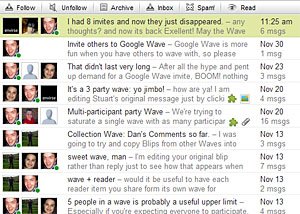



 Carpet Bomberz Inc.