At $60, this is right-sizing the price for what is essentially a second screen for your smartphone. Take THAT! Google Glass(es). That’s what I’m calling them,… Google Glasses, because that’s what they are. Glasses with a head mounted display.
Category: technology
General technology, not anything in particular
-
The CompuServe of Things

English: Photo of two farm silos (Photo credit: Wikipedia) Summary
On the Net today we face a choice between freedom and captivity, independence and dependence. How we build the Internet of Things has far-reaching consequences for the humans who will use—or be used by—it. Will we push forward, connecting things using forests of silos that are reminiscent the online services of the 1980’s, or will we learn the lessons of the Internet and build a true Internet of Things?
Phil Windley as absolutely right. And when it comes to Silos, consider the silos we call App Stores and Network Providers. Cell phones get locked to the subsidizing provider of the phone. The phone gets locked to the app store the manufacturer has built. All of this is designed to “capture” and ensnare a user into the cul-de-sac called the “brand”. And it would seem if we let manufacturers and network providers make all the choices this will be no different than the cell phone market we see today.
Related articles
-

Everything You Ever Wanted To Know About Apple’s OS X Yosemite Beta Preview
Looking forward to the next version of Mac OS X? I’m curious to see how well it performs on older graphics card and desktop hardware that’s for sure. As far as User Experience goes and the Interface Design changes, I’m going to hold judgement. As long as everything works as intuitively as the older version I’m fine with that. I don’t care what the icons look like or the title bar or menu bars, none of that really impacts my experience. But speed, and the sense of speed does. I’m hoping the Swift programming language has some big returns on investment for this release of the Desktop OS and we see the iLife Suite slowly migrated into Swift to gain further efficiencies in the use of the graphics accelerator card and the CPU and the SSD.
-
MIT Puts 36-Core Internet on a Chip | EE Times

Partially connected mesh topology (Photo credit: Wikipedia) Today many different interconnection topologies are used for multicore chips. For as few as eight cores direct bus connections can be made — cores taking turns using the same bus. MIT’s 36-core processors, on the other hand, are connected by an on-chip mesh network reminiscent of Intel’s 2007 Teraflop Research Chip — code-named Polaris — where direct connections were made to adjacent cores, with data intended for remote cores passed from core-to-core until reaching its destination. For its 50-core Xeon Phi, however, Intel settled instead on using multiple high-speed rings for data, address, and acknowledgement instead of a mesh.
via MIT Puts 36-Core Internet on a Chip | EE Times.
I commented some time back on a similar article on the same topic. It appears now the MIT research group has working silicon of the design. As mentioned in the pull-quote, the Xeon Phi (which has made some news in the Top 500 SuperComputer stories recently) is a massively multicore architecture but uses a different interconnect that Intel designed on their own. These stories as they appear get filed into the category of massively multicore or low power CPU developments. Most times the same CPUs add cores without significantly drawing more power and thus provide a net increase in compute ability. Tilera, Calxeda and yes even SeaMicro were all working along towards those ends. Either through mergers, or cutting of funding each one has seemed to trail off and not succeed at its original goal (massively multicore, low power designs). Also along the way Intel has done everything it can to dull and dent the novelty of the new designs by revising an Atom based or Celeron based CPU to provide much lower power at the scale of maybe 2 cores per CPU.
Like this chip MIT announced Tilera too was originally an MIT research product spun off of the University campus. Its principals were the PI and a research associate if I remember correctly. Now that MIT has the working silicon they’re going to benchmark and test and verify their design. The researchers will release the verilog hardware description of chip for anyone use, research or verify for themselves once they’ve completed their own study. It will be interesting to see how much of an incremental improvement this design provides, and possibly could be the launch of another Tilera style product out of MIT.
Related articles
-
UK Startup Blippar Confirms It has Acquired AR Pioneer Layar | TechCrunch

Cool Schiphol flights #layar (Photo credit: claudia.rahanmetan) The acquisition makes Blippar one of the largest AR players globally, giving it a powerful positioning in the AR and visual browsing space, which may help its adoption in the mass consumer space where AR has tended to languish.
via UK Startup Blippar Confirms It has Acquired AR Pioneer Layar | TechCrunch.
Layar was definitely one of the first to get out there and promote Augmented Reality apps on mobile devices. Glad to see there was a enough talent and capability still resident there to make it worthwhile acquiring it. It’s true what they say in the article that the only other big name player in this field helping promote Augmented Reality is possibly Oculus Rift. I would add Google Glass to that mix as well, especially for AR (not necessarily VR).
Related articles
-
Doug Englebart’s Grocery List
I’m such a big fan of the Fall Western Joint Computer Conference (FWJCC) 1968 in San Francisco. It was such an awesome production put on.
If you’ve watched the Mother of All Demos, you know that one of the aha! moments of it is when Englebart pulls out his grocery list. The idea is pretty simple –if you put your grocery list into a computer instead of on a notepad, you could sort it, edit, clone it, categorize it, drag-and-drop reorder it.
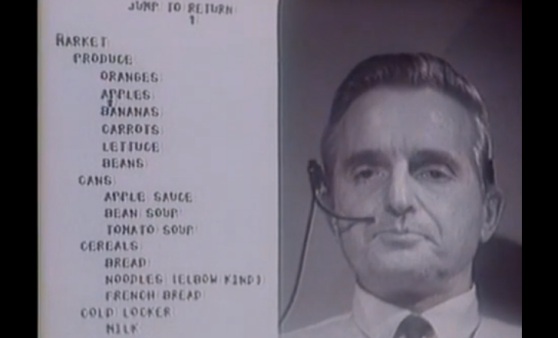
That was 1968. So how are we all doing?
If you’re like my family, there’s probably multiple answers to that, but none particularly good. When Nicole shops, she writes it out on a sheet of paper, and spends a good amount of time trying to remember all the things she has to get. I sometimes write it out in an email I send myself, and then spend time trying to look for past emails I can raid for reminders.
Sorting? Cloning? Drag and drop refactoring?
Ha! What do you think this is, the…
View original post 472 more words
-
Why Microsoft is building programmable chips that specialize in search — Tech News and Analysis

English: Altera Stratix IV EP4SGX230 FPGA on a PCB (Photo credit: Wikipedia) SUMMARY: Microsoft has been experimenting with its own custom chip effort in order to make its data centers more efficient, and these chips aren’t centered around ARM-based cores, but rather FPGAs from Altera.
via Why Microsoft is building programmable chips that specialize in search — Tech News and Analysis.
FPGAs for the win, at least for eliminating unnecessary Xeon CPUs for doing online analytic processing for the Bing Search service. MS are saying they can process the same amount of data with half the number of CPUs by offloading some of the heavy lifting from general purpose CPUs to specially programmed FPGAs tune to the MS algorithms to deliver up the best search results. For MS the cost of the data center will out, and if you can drop half of the Xeons in a data center you just cut your per transaction costs by half. That is quite an accomplishment these days of radical incrementalism when it comes to Data Center ops and DevOps. The Field Programmable Gate Array is known as a niche, discipline specific kind of hardware solution. But when flashed, and programmed properly and re-configured as workloads and needs change it can do some magical heavy lifting from a computing standpoint.
Specifically I’m thinking really repetitive loops or recursive algorithms that take forever to unwind and deliver a final result are things best done in hardware versus software. For Search Engines that might be the process used to determine the authority of a page in the rankings (like Google’s PageRank). And knowing you can further tune the hardware to fit the algorithm means you’ll spend less time attempting to do heavy lifting on the General CPU using really fast C/C++ code instead. In Microsoft’s plan that means less CPUs need to do the same amount of work. And better yet, if you determine a better algorithm for your daily batch processes, you can spin up a new hardware/circuit diagram and apply that to the compute cluster over time (and not have to do a pull and replace of large sections of the cluster). It will be interesting to see if Microsoft reports out any efficiencies in a final report, as of now this seems somewhat theoretical though it may have been tested at least in a production test bed of some sort using real data.
Related articles
-

Supercapacitors are slowly emerging as novel tech for electric vehicles
Yes, supercapacitors might be the key to electronic vehicles that’s true. They are used now in different capacities as backup power for different electronic equipment and in some industrial uses as backup to distribution equipment. I think a company pursuing this should also consider the products and work done by American Superconductor in Massachussetts (NYSE: AMSC). Superconducting wire paired up with a electric motors wound with the same wire and a bank of Supercapacitors could potentially be a killer app of these combined technologies. Doesn’t matter what the power source is (Fuel Cell vs. plug-in), but the whole drive train could be electric and be high performance as well.
A couple years ago Tesla CEO Elon Musk offhandedly said that he thought it could be capacitors — rather than batteries — that might be the energy storage tech to deliver an important breakthrough for electric transportation. Tesla cars, of course, use lithium ion batteries for storing energy and providing power for their vehicles, but Musk is an engineer by nature, and he likes what ultracaps offer for electric cars: short bursts of high energy and very long lasting life cycles.
Capacitors are energy storage device like batteries, but they store energy in an electric field, instead of through a chemical reaction the way a battery does. A basic capacitor consists of two metal plates, or conductors, separated by an insulator, such as air or a film made of plastic, or ceramic. During charging, electrons accumulate on one conductor, and depart from the other.
 A bus using ultracapacitor tech from Maxwell…
View original post 465 more words
-
With ‘The Machine,’ HP May Have Invented a New Kind of Computer – Businessweek

An image of a circuit with 17 memristors captured by an atomic force microscope. Each memristor is composed of two layers of titanium dioxide connected by wire. As electrical current is applied to one layer, the small signal resistance of the other layer is changed, which may in turn be used as a method to register data. HP makes memory from a once-theoretical circuit (Photo credit: Wikipedia) If Hewlett-Packard (HPQ) founders Bill Hewlett and Dave Packard are spinning in their graves, they may be due for a break. Their namesake company is cooking up some awfully ambitious industrial-strength computing technology that, if and when it’s released, could replace a data center’s worth of equipment with a single refrigerator-size machine.
via With ‘The Machine,’ HP May Have Invented a New Kind of Computer – Businessweek.
Memristor makes an appearance again as a potential memory technology for future computers. To date, flash memory has shown it can scale for a while far into the future. What benefit could there possibly be by adopting memristor? You might be able to put a good deal of it on the same die as the CPU for starters. Which means similar to Intel’s most recent i-Series CPUs with embedded graphics DRAM on the CPU, you could instead put an even larger amount of Memristor memory. Memristor is denser than DRAM and stays resident even after power is taken away from the circuit. Intel’s eDRAM scales up to 128MB on die, imagine how much Memristor memory might fit in the same space? The article states Memristor is 64-128 times denser than DRAM. I wonder if that also holds true from Intel’s embedded DRAM too? Even if it’s only 10x denser as compared to eDRAM, you could still fit 10x 128MB of Memristor memory embedded within a 4 core CPU socket. With that much available space the speed at which memory access needed to occur would solely be determined by the on chip bus speeds. No PCI or DRAM memory controller bus needed. Keep it all on die as much as possible and your speeds would scream along.
There are big downsides to adopting Memristor however. One drawback is how a CPU resets the memory on power down, when all the memory is non-volatile. The CPU now has to explicitly erase things on reset/shutdown before it reboots. That will take some architecture changes both on the hardware and software side. The article further states that even how programming languages use memory would be affected. Long term the promise of memristor is great, but the heavy lifting needed to accommodate the new technology hasn’t been done yet. In an effort to help speed the plow on this evolution in hardware and software, HP is enlisting the Open Source community. It’s hoped that some standards and best practices can slowly be hashed out as to how Memristor is accessed, written to and flushed by the OS, schedulers and apps. One possible early adopter and potential big win would be the large data center owners and Cloud operators.
In memory caches and databases are the bread and butter of the big hitters in Cloud Computing. Memristor might be adapted to this end as a virtual disk made up of memory cells on which a transaction log was written. Or could be pointed to by OS to be treated as a raw disk of sorts, only much faster. By the time the Cloud provider’s architects really optimized their infrastructure for Memristor, there’s no telling how flat the memory hierarchy could become. Today it’s a huge chain of higher and higher speed caches attached to spinning drives at the base of the pyramid. Given higher density like Memristor and physical location closer to the CPU core, one might eliminate a storage tier altogether for online analytical systems. Spinning drives might be relegated to the task of being storage tape replacements for less accessed, less hot data. HP’s hope is to deliver a computer optimized for Memristor (called “The Machine” in this article) by 2019 where Cache, Memory and Storage are no longer so tightly defined and compartmentalized. With any luck this will be a shipping product and will perform at the level they are predicting.
Related articles
-

Apple Brings Better Discussion, iPad Course Creation To iTunes U
I manage iTunes U at the University where I work. I’m glad to know Apple keeps on working on it, adding features and fixing bugs. It now seems even more useful as a lightweight Course Management System. Had they tried doing this from the earliest days, it’s likely they could have gained some loyal fan base that eventually bought into Blackboard, Angel, Canvas etc.


 Carpet Bomberz Inc.